My Mosaic Transition

Untitled \(397 x 102 px\) \(363 x 102 px\) \(1\)
Untitled \(397 x 102 px\) \(363 x 102 px\) \(2\)
billin
alert
paperless
usage

Latest News

Announcements

Here are some important steps to take when registering for MyMosaic:

  • Account number: Use your account number to register for MyMosaic. You can find your account number on your monthly bill.
  • Register for your online account: We have recently completed a system upgrade that requires all members with online accounts to re-register. The new system significantly increases the amount of information you have access to regarding your account, including your daily and hourly energy usage.
  • Update your online payment options: If you previously were using automatic payments with us, you will need to re-enter your payment information. You can do this once you register for your online account.

MyMosaic Success Checklist

Screenshot 2026\-06\-03 105310

Introducing our New MyMosaic App and Web Portal
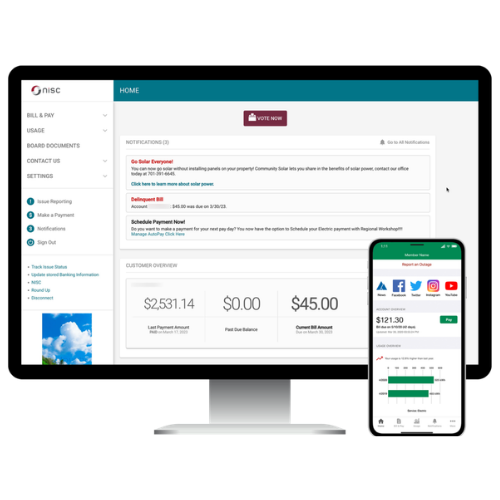
Phone and Computer

How can the new MyMosaic App help you
control your account?

Our MyMosaic app and web portal will keep you informed and will show you where to save time and money on your bills.

Billing & Payments: No more waiting for your bill to arrive in the mail, access your bill at anytime from anywhere. Save time with easy payment options to avoid late fees and service interruptions.

Alerts & Notifications: Stay informed on important account events via email or text messages. Receive the information you need to make the right decisions about your account.

Paperless Billing: What if you could save some time and a tree at the same time? Activate MyMosaic paperless billing, an eco-friendly way to instantly access your bill.

Usage Monitoring: Worrying about usage or surprising bill amounts can be stressful. With access to this information, you can be in control and make decisions that can help reduce your bill.

Our new MyMosaic app and web portal give you complete control over your account by giving you the tools that deliver the right information at the right time so you can make the right decisions about your account.

Untitled design \- 2026\-06\-05T084543\.003
Untitled design \- 2026\-06\-05T084647\.336
Untitled design \- 2026\-06\-05T084903\.781

FAQs: How-To Register for MyMosaic

You can find your account number on a printed bill statement mailed to your residence or business.

You can also call us for assistance.

You may choose how you receive notifications from MyMosaic (email or SMS) by updating your notifications preferences.

  • Click on Manage Notifications to set up SMS and email alerts
  • Log in to your MyMosaic account
  • Click on “Notifications”
  • Click Manage Contacts to add or change email address and phone numbers
  • Enter verification code to activate
  • Click on Manage Notifications to set up SMS and email alerts

You can save bank account and/or credit/debit card information for future one-time payments.

On the website:

  • Click My Profile
  • Click on Manage My Stored Payment Accounts and follow instruction

On the app:

  • Select Settings
  • Select Stored Payment Accounts and follow instructions

Auto Pay allows you to pay your monthly bill through an automated draft from your bank account or credit card at no extra charge. By enrolling in Auto Pay, you authorize us to withdraw funds from your selected account to pay your monthly bill on the due date.

How to sign up on the website:

  • Click on Billing & Payments
  • Click on Auto Pay Program
  • Click on Sign Up for Auto Pay and follow instructions

How to sign up on the app:

  • Select Bill & Pay
  • Select Auto Pay Program and follow instructions

No. It is provided as an option for your convenience. If you do not sign up for paperless billing in MyMosaic, you will continue to receive a monthly bill in your mail.

When we upgraded our systems, those who were previously enrolled in paperless billing were not able to be carried over, so while we understand it’s inconvenient, we do appreciate your understanding of having to enroll again.

You can choose to participate in paperless billing, which sends bill statements to the email address on your account. You will no longer receive a copy of your bill in the mail.

Here’s how to change your preference to participate in paperless billing:

On the website:

  • Click on My Profile
  • Click on Update My Paperless Settings.
  • Choose your paperless preference

On the app:

  • Select Settings
  • Select Paperless Billing
  • Choose your paperless preference

FAQs: How-To Manage Notifications

No. The two most common forms of notifications are email and text. You have the option to enter your cell phone, but it is not required. You can control what messages are sent to your phone if you do choose to enter it.

FAQs: How-To Set Up Auto Pay

Auto payments allows you to enjoy the convenience of automating your account so you never miss a bill payment and keep your services up and running.

Save time: You no longer have to manage all of your monthly bills manually.

Save Money: Stop paying for potential late fees or service interruptions when you don’t have to!

Setting up Auto Pay in MyMosaic is as easy as 1, 2, 3…

Step 1: Log in to MyMosaic

Step 2: Set up Auto Pay in just a few clicks. Instructions can be found below.

Step 3: Rest easy knowing your bills will be paid on time!

FAQs: Paperless Billing

Paperless billing in MyMosaic is the eco-friendly way to get instant access to your bill and declutter your life.

Save time: You no longer have to wait for your bill to arrive in the mail. You get instand access to your bill the minute it is published.

Declutter your desk: Cut down on the stack of paper invoices on your desk. You’ll feel more organized and be doing the planet a big favor!

Absolutely!

You deactivate paperless billing by simply visiting the paperless billing screen within the web portal or mobile app and and moving the slider to the off position.

You can change our preferences anytime from anywhere!

Other Frequently Asked Questions (FAQs)

Yes. All critical information is encrypted in every transaction run and no personal information is stored on your phone or tablet.

Mobile devices do offer you the ability to store your login information for apps installed on the device. If you choose to store your login information, any person who has access to your mobile device can access your account.

Both platforms are part of our online account management system for members.

Both the web version and mobile app allow you to securely access their account information, change your personal information, manage notifications, update stored payment methods, view bills and payment history, make payments, and report issues.

The free, secure mobile app is available to download and install on mobile devices and tablets.

No. You can take advantage of all the features of MyMosiac or you can continue to pay your bill as you currently do.

Yes. MyMosaic shows all of your accounts, along with the amounts due for those accounts. You may make a payment to a single account or multiple accounts from both the website and mobile app.

The information you see in the app and on the website is shown in real-time.

However, if you keep your app or web version open for an extended time, you should refresh the page by selecting a new option in order to ensure the information is current.

Please know that throughout this communication process, we will never call or email you to ask for credit card numbers, bank account routing numbers or any other type of personal information.

If you do receive such communication from someone claiming to be a our Employee, please report it to us

Get Support

If you run into any questions as you explore the features of SmartHub, we will be happy to assist you with any questions!

Address: 401 S 1st St, Cameron, WI

Phone: (715) 458-5400

Mosaic Technologies Showroom Grand Opening

Join us at our Cameron Office (401 S 1st. St.) on June 18th 5pm-7pm

Be the first to see our brand new showroom featuring security packages, home and office smart automation, window treatments, speakers, TVs, and our wide variety of custom design solutions! We’ll also be providing special promos, free drawings and raffles, and refreshments, so don’t miss out!